Brand Color Palette Strategy: From Logo to Design System Tokens
A brand color that looks stunning on a business card or billboard often collapses when forced into a web application. An interface requires hover states, disabled inputs, active tabs, dark mode adjustments, and accessible contrast ratios. Here is how product designers transform a static brand identity into a scalable, accessible design token engine.
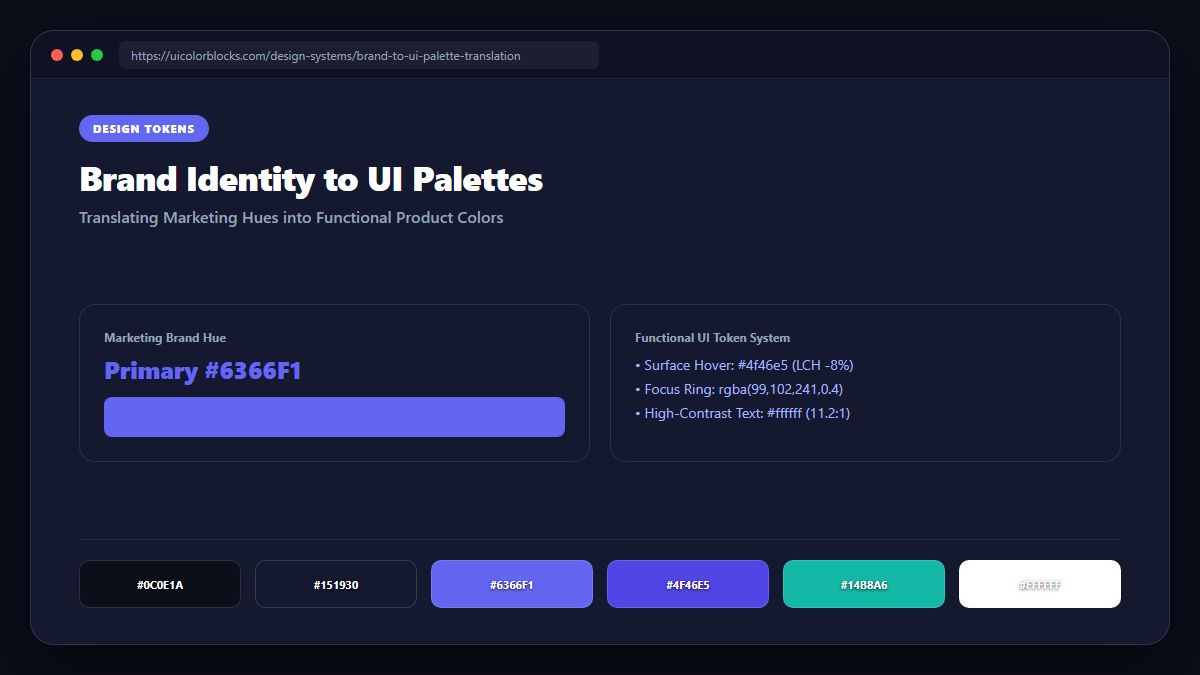
1. The Common Fallacy: "We Only Need Two Brand Colors"
Traditional marketing agencies deliver brand guidelines featuring a primary color, a secondary color, and black and white. When frontend developers attempt to build an interface with only these four tokens, severe problems immediately emerge:
- Missing Interaction States: What color does the primary button turn when hovered or pressed? Blending pure black makes the hue look muddy.
- Border & Divider Gaps: Using pure brand colors for borders creates overwhelming visual noise that distracts from core content.
- Accessibility Failures: Saturated yellow or light orange logos fail WCAG AA contrast (4.5:1) when rendered as button text on white backgrounds.
2. Transforming One Brand Hue into an 11-Step UI Scale
The modern standard—codified by Tailwind CSS, Material Design 3, and Radix Colors—is to derive an 11-step scale from your primary brand color, labeled 50 through 950:
3. Assigning Semantic Roles to Your Brand Spectrum
Once your 50–950 scale is generated using our Color Shades Generator, map each tier to clear UI components:
- 50: Subtle background wash for active navigation items, selected table rows, or banner alerts.
- 100 & 200: Badge pill backgrounds and soft focus borders.
- 500 (Primary Base): Primary buttons, progress bars, switch toggles, and brand badges.
- 600: The default hover state for primary action buttons.
- 700: Active / pressed button states and high-contrast link text on light canvases.
- 900 & 950: Dark mode background canvas layers and high-emphasis card headers.
4. Color Psychology Across Digital Industries
Different hues evoke subconscious emotional responses that prime users for specific actions:
- Blue (#2563EB / #0284C7): Trust, algorithmic reliability, and institutional security. Dominates fintech, healthcare, and enterprise cloud software.
- Purple & Violet (#7C3AED / #6366F1): Innovation, artificial intelligence, creativity, and luxury. Highly effective for SaaS developer tools, creator platforms, and AI assistants.
- Green & Mint (#10B981 / #059669): Wealth creation, sustainability, and physical vitality. Standard for investment platforms, environmental apps, and wellness trackers.
- Amber & Orange (#F59E0B / #EA580C): Warmth, energy, urgency, and hospitality. Proven to lift conversions on food ordering and lifestyle e-commerce.
Brand Color Strategy FAQs
How do I turn a brand logo color into an interface palette? +
Can a brand use more than one primary color? +
What should I do if my brand color fails WCAG contrast? +
Ready to Scale Your Brand Colors?
Generate production-ready Tailwind configs and CSS variable tokens from any brand HEX code instantly.
The 3-Tier Design System Token Architecture
Scaling a brand color palette across multiple platforms—web, iOS, Android, and marketing sites—requires decoupling visual brand values from their functional implementation. Industry-leading design systems (like Adobe Spectrum, Shopify Polaris, and GitHub Primer) organize color tokens into a strict three-tier hierarchy:
| Token Tier | Scope & Purpose | Naming Pattern | Code Example |
|---|---|---|---|
| 1. Global Primitive Tokens | Raw color definitions with no semantic meaning. Scales from 50 to 950. | color-{family}-{step} |
--blue-600: #2563EB;--slate-900: #0F172A; |
| 2. Semantic Intent Tokens | Contextual meaning assigned to primitives based on functional intent. | color-{context}-{role} |
--color-action-primary: var(--blue-600);--color-surface-base: var(--slate-900); |
| 3. Component Scoped Tokens | Direct bindings to specific UI components for safe theme encapsulation. | {component}-{part}-{property} |
--button-primary-bg: var(--color-action-primary);--card-border: var(--color-border-subtle); |
Preventing Theme Collisions in Multi-Theme Applications
When supporting both light and dark themes, brand teams often make the mistake of hardcoding logo colors into component styles. For instance, if your brand identity relies on deep navy blue (#0A2540), placing that exact color as a dark mode card background causes text to become invisible and ruins surface contrast.
Instead, use semantic aliases that reference distinct primitive scales per theme:
:root {
  /* Light Theme Mapping */
  --bg-canvas: #FFFFFF;
  --bg-surface: #F8FAFC;
  --text-primary: #0F172A;
  --brand-interactive: #2563EB; /* Blue 600 */
}

[data-theme="dark"] {
  /* Dark Theme Mapping */
  --bg-canvas: #090A0F;
  --bg-surface: #141724;
  --text-primary: #F1F5F9;
  --brand-interactive: #60A5FA; /* Blue 400 (Desaturated for dark mode) */
}
Automating Brand Accessibility in CI/CD Pipelines
Manual color audits during design handoff frequently break down as teams scale. Engineering teams should integrate automated color token linters and accessibility test suites directly into continuous integration workflows. Tools like @axe-core/cli, pa11y, and Stylelint color-format plugins can intercept accessibility regressions before pull requests merge to production:
# Run automated WCAG AA contrast check across all UI components
npx pa11y-ci --threshold 0 --standard WCAG2AA http://localhost:3000

# Enforce design token usage and block arbitrary HEX literals in CSS
npx stylelint "**/*.css" --config .stylelintrc.json
Brand Color Documentation and Design System Governance
A brand color palette is only as resilient as the governance documentation supporting it. When introducing design tokens to a cross-functional organization, establish clear operational guidelines specifying which tokens apply to interactive components versus decorative brand accents:
- Interactive Brand Primary (e.g.,
#2563EB): Reserved strictly for primary call-to-action buttons, active navigation states, focused form inputs, and key user journey conversions. Never dilute interactive buttons by using brand primary for passive content borders or informational tags. - Supporting Secondary Accents (e.g.,
#0D9488or#7C3AED): Designated for badges, secondary feature highlights, charts, and progress bars. Secondary accents should never compete visually with the primary conversion trigger. - Neutral Surface Foundations (e.g.,
#0F172Aand#F8FAFC): Structural background and container colors designed to provide high-contrast canvases that ensure text readability and effortless visual hierarchy. - Semantic Feedback Warnings (e.g.,
#DC2626,#16A34A,#D97706): Universal status signals that communicate system health, form validation, and transactional outcomes without relying solely on hue differences.
Documenting these exact rules in your team's design system handbook ensures that as new engineers and designers onboard, every digital touchpoint maintains pristine brand cohesion and effortless accessibility compliance.